




The AI revolution meets Claris FileMaker.
Artificial intelligence (AI) is no longer just a buzzword. It’s transforming how businesses operate. From automating repetitive tasks to providing instant insights, AI reshapes workflows across industries. But for some FileMaker developers, integrating AI into custom apps has often felt difficult or too time-consuming.
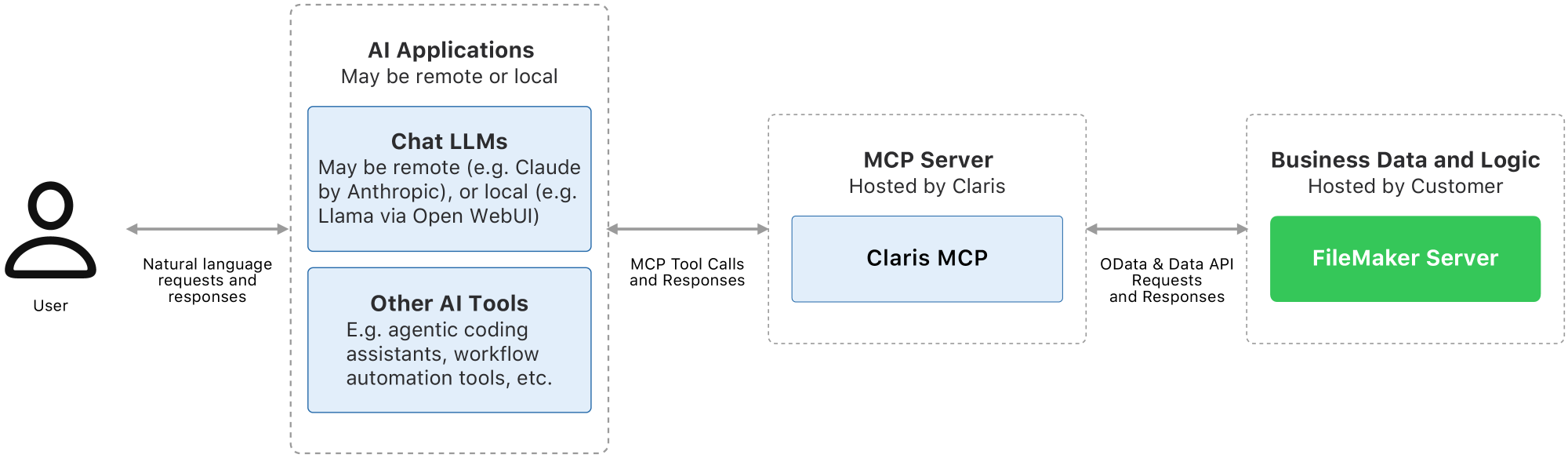
Enter Claris MCP (Model Context Protocol), a new tool that bridges the gap between FileMaker and AI assistants like Claude. Think of MCP as a translator that helps FileMaker solutions communicate with large language models without requiring new programming languages or heavy API work.
For FileMaker developers, MCP introduces a low-friction way to bring AI capabilities into FileMaker solutions. Whether you’re a seasoned developer or a problem solver managing business apps, MCP makes it possible to expose FileMaker data and scripts to AI in a secure, controlled, and future-proof way.
In this blog, we’ll explore why MCP is a must-have for FileMaker developers, how it simplifies AI integration, and why it’s a strategic move for staying ahead in a rapidly evolving tech landscape.
What Is MCP, and why should FileMaker developers know about it?
1. MCP: The universal connector for AI.
MCP (Model Context Protocol) is an open standard introduced by Anthropic in late 2024. It acts like a translator for AI, providing a standardized way for applications to share context with large language models. Instead of building custom APIs for every AI tool, MCP lets AI assistants understand and interact with your FileMaker data and scripts—naturally and conversationally.
For FileMaker developers, this means:
- No more custom API development. MCP handles most of the integration work.
- No need to learn new programming languages—it works with your existing FileMaker setup.
- No vendor lock-in. MCP is compatible with multiple AI clients like Claude.
2. Claris MCP: AI integration made simple.
Claris MCP is Claris’s implementation of this protocol, designed to work with our hosted solutions. It allows developers to:
- Expose FileMaker data and scripts to AI assistants.
- Enable natural language interactions—users can ask questions or trigger actions in plain English.
- Maintain full control over security, permissions, and business logic.
Unlike traditional API integrations, MCP reduces or removes the need to write custom code. Instead, it dynamically generates tools based on your database structure, making AI integration possible with configuration rather than custom scripting.
Top five reasons why MCP is a big deal for FileMaker developers.
1. No-code AI integration.
One common barrier to AI adoption has been the need for specialized programming work. With MCP, you don’t need to write a single line of Python or JavaScript.
- Automatic tool generation: MCP scans your FileMaker database and exposes scripts as AI-accessible functions.
- No manual API development: Skip the REST API documentation and let MCP handle the connection.
- Works with your existing setup: You configure MCP on FileMaker Server and define what to expose.
2. Native FileMaker integration—no rebuilding required.
MCP is built to work with FileMaker Server 2025, so you don’t have to change how your app functions.
- Leverage existing scripts: AI can trigger approved FileMaker scripts using the permissions and logic you define.
- Preserve business logic: Your workflows stay intact—AI just becomes another way to interact with them.
- No data migration: MCP connects directly to your FileMaker Server, so your data stays where it is.
3. Keep your custom apps adaptable as AI tools evolve.
The AI landscape is evolving fast. MCP ensures your FileMaker solutions stay relevant by:
- Supporting multiple AI clients.
- Adapting to new AI tools without reworking integrations.
- Keeping your apps competitive as businesses demand AI capabilities.
4. Security and control.
Security is a top concern when connecting AI to business data. Claris MCP addresses this with:
- Granular permissions: Control which tables, scripts, and operations AI can access.
- No direct database access: AI interacts only through mediated, auditable requests.
- FileMaker Server logging: Track all AI-driven actions for transparency.
5. Empower end users with natural language.
One of the most impactful benefits is how it can improve user experience. Instead of navigating complex interfaces, users can simply ask questions like:
- “How many orders shipped last week?”
- “Create a dashboard of average fulfillment times by employee.”
- “Reassign this task to Robert and notify him.”
This reduces dependency on developers for routine data requests, while delivering more value to your business users.
How MCP solves real pain points for FileMaker developers.
AI integrations are complex and time-consuming, leaving many FileMaker developers without the time or expertise to build custom solutions—even as business users demand AI-powered insights.
MCP removes this barrier by automating tool exposure without manual API coding, enabling quick AI queries and natural language interactions using the familiar FileMaker interface.
Real-world use Cases for FileMaker + MCP.
1. Instant data Insights.
Instead of running reports or requesting new scripts, users can ask:
- “What’s our monthly revenue trend?”
- “Which customers haven’t placed orders in 90 days?”
2. Automated workflows.
AI can trigger FileMaker scripts, such as:
- “Update the invoice status to ‘Paid’ and email the client.”
- “Schedule a follow-up task for next week.”
3. Dynamic dashboards on demand.
Users can request custom visualizations without waiting for a developer:
- “Show me a chart of sales by region.”
- “Compare this month’s performance to last year.”
4. Smarter customer support.
AI can pull customer data and suggest actions:
- “What’s the status of Order #12345?”
- “What’s the best upsell opportunity for this client?”
The future of FileMaker with MCP.
As AI integrates deeper into business workflows, FileMaker developers adopting MCP will deliver greater client value with AI-powered features, automate repetitive tasks, and outpace competitors still using traditional interfaces.
MCP gives FileMaker developers a practical path to secure, scalable AI integration—saving time with no-code connections, empowering users through natural language interactions, and future-proofing apps for the AI era.
For developers who want to stay efficient and responsive to user needs, MCP provides an accessible way to introduce AI into FileMaker solutions without major complexity.
Geographic Availability.
- Phase 1: Claris MCP is accessible in most regions globally, but only AMR is formally supported at initial release. Since our servers are based in US West, users outside the U.S. may experience slower load times.
- Phase 2: Expanded regional support in worldwide data centers (same regions as covered by FileMaker Cloud).
Ready to get started?
Claris MCP is an early release, and we are actively learning alongside our developer community. While the core functionality is in place, you may encounter rough edges as you explore how MCP fits into your solutions. That is expected at this stage.
We are intentionally making MCP available now so FileMaker developers can experiment, test real use cases, and help shape what comes next. Your feedback will directly influence how MCP evolves.
Dive into Claris MCP and start exploring AI integration with FileMaker:
As you try it out, we would love to hear what works and where you see the most potential. The best place to share feedback and engage with the development team is on the dedicated Claris MCP page in the Claris Community.